|
A word before:
This book will teach you the basics of the DizzyAGE editor and how to use it to create game maps.
It also explains a few necessary elements on witch all DizzyAGE games are based on, like tile maps,
brushes and brush properies. It is important for you to read it before starting with the DizzyAGE manual,
because here you will be able to understand these elements in a more visual enviroment.
You don't need any special knowlege to read this book. Just basic PC operating stuff and of course you
must have an idea of how a DizzyAGE game looks like.
The
DizzyAGE
editor is a tool that helps you create map files for DizzyAGE games.
These maps are called tile maps because they are made from a lot of
tiny images called tiles, placed in a rectangular area, also known as the world.
So, instead of painting a huge image for the whole world, the editor allows you to choose tiles from a limited set
and place them on the map, as many times you want, using different colors or other visual properties.
And instad of storing the final image, a tile map file will only remember what tiles were placed, where and with what colors.
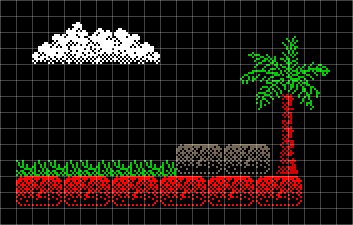
This makes the tile map technology very popular among 2D games. Here is a small part of such a map, as an example:
You can see there is only one brick tile, repeated in two colors, the grass tile, also repeating a few times,
the white cloud tile, the tree trunk, as one tile and the leafs as another. You can imagine how beautiful and
complex your world can look like, if you have a nice set of tiles and a good inspiration.
The DizzyAGE maps are partitioned in fixed size rooms.
Since in most Dizzy games the player moves from room to room, instead of having a scrolling background behind him,
this partitioning helps you decide which tiles you place in each room. Here is an example of four rooms from a map:
The DizzyAGE editor can also be used for other kind of games based on the DizzyAGE game engine. Just use a different set of tiles.
Even more, it can be used for games made with other engines as long as they know how to load and display the tile map saved by the editor.
Conclusion
In this chapter you have learned a little about tile maps, world and rooms.
Next you will learn about tiles and their file format.
|
|