|
3.1 About values and types
Programs work with data.
Each data has a value and a type.
Think about numbers. Numbers can be integers (like 1, 2, 3, etc.) or
they can be fractional (like 0.5, 1.0, 2.9, etc), also called floats
in some programming languages.
For the numbers, the type of data is "integer" or "float"
and the values are 1, 2, 0.5, 1.0, etc.

Take care, because maybe for you a float number like 1.0 means the same thing
as the integer number 1, or the text "1", but for a program, they are very different!
The data that can be used in programs is not limited only to integer and float
numbers. Programs can also work with text strings,
as you have seen in the simple example from the previous chapter. There, the
"Hello World!" was the value of a string data.
When used by a program, fixed values like 1, 2.9, or "Hello
World!", are called constants.
3.2 Storing data
To work with data, programs must be able to store the data values in some memory locations for later use.
Imagine I ask you to retain the number 2 in your mental memory,
and then I ask you to memorize also the number 3. You have just stored two different values in your memory.
Now, if I ask you to add both of them and memorize the result, you will use another memory place to store the value 5.
This is also how the programs work.
Those memory locations are called variables,
because they can store different values during the program's execution.
Of course at one moment, there is only one value in such a variable, but later, the program
can change it.
Variables are addressed by the program using their given names.
If you want to store an amount of money in a variable, you would probably
use a representative name for you, like "money" or "my_money".
Then, you can write in the program money=10; to store the integer
value of 10 in the "money" variable, for later use. After setting
a new value in a variable, the old value that was stored there is lost.
Variable names can include characters like 'a' to 'z' or 'A' to 'Z', digits
'0' to '9' and the underline character '_', but they can't start with a digit.
GS9 is a case sensitive language, meaning it does
matter if you use lower or upper characters. The "Money" and "money"
will be two different variables.

Here are some examples of variable names.
a, b, i, j,
money, counter, Counter, Count_100_numbers, test1, test2,
test_flag, temporary_variable, first_name, FirstName, some_long_variable_name
There are some restricted names, that you can't choose, called "reserved words".
break, breakpoint, continue,
do, else, false, float, for, func, goto,
if, int, NUL, VOID, ref, return, sizeof, stop,
str, tab, ptr, true, typeof, var, while
Because a variable can keep a value, it also has a type, that, in most programming
languages, must corespond to the value's type. So, you can't store a text value
in an integer variable.
In GS9 you declare (create) a variable at the first moment when you set a value
to it. And it's type will be set to the value's type. After that, you can store
only values of that type in that variable. Let's see another program example.

As before, edit the program.txt file and write the folowing content:
Run the above program and check the results. On 5 lines you should see the numbers 1, 10, 20, 20 and the NUL word.
3.3 Basic data types
Let's now have a look at the basic data types that can be used in GS9 language.
As most programming languages, GS9 can work with integer numbers.
Examples of integer numbers: -10, -1, 0, 1, 2, 3, 1000,1000000
The highest value that can be represented by an integer number is 2,147,483,647.
That is pretty big!
The lowest value is -2,147,483,648. And that is pretty small!
To convert other types to integer numbers you must add the prefix (int) before the variable or constant.
Float numbers have an integer part and a fractional part.
In GS9 you must always specify both of them for the interpreter to know they are not integers.
Examples of float numbers: -1.0, 0.0, 0.01, 0.5, 1000.0
To convert other types to float numbers you must add the prefix (float) before the variable or constant.
String types are used to work with text data.
They are represented by a series of characters, between quotation marks.
Examples: "Hello World!", "some text"
An empty string is equal to "" and has no visible characters inside.
An invalid string is equal to VOID, that is even "less" than an empty string.
Escape characters are supported (
\\,
\r,
\n,
\t,
\",
meaning back slash, return carret, new line, tab and quote).
To convert integers or floats to strings you must add the prefix (str) in front of the variable or constant.
Even more, you can specify some conversion options, that allows you to format the result with leading zeros or with a specific number of decimals.
See the examples.
One thing that will be explained a little later, but which is worth mentioning here,
is that every string, except VOID strings, have an extra hidden character, to mark their ends.
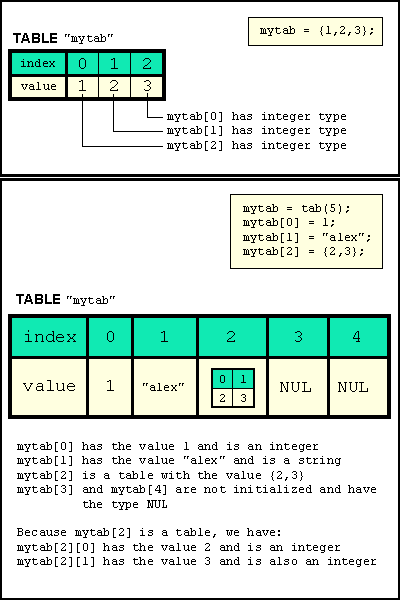
Tabels are used to store lists of data.
Examples: {1,2,3}, {"one","two","three"}, { }
The number of elements from a table gives the table's size.
The data elements inside a table can be addressed by indexing with a special indexing operator [ ].
Let's see some relevant examples.
So, as we see from the program above, a table works like an indexed list of variables.
Note that the indexes in a table start with 0 for
the first element and end with the size-1 (element count - 1), for the last element.
You can create an unitialized table using tab word
and specifying the size of the table. And you can't convert any other types to the table type.
 Here are two graphic examples. Here are two graphic examples.
3.4 Special data types
In GS9 language, there are another three data types, used only on special occasions.
REFERENCE (ref)
Reference variables are used to access other variables, without using them directly.
It's like remembering the number of an interesting page from a book, instead of remembering all it's content.
Later you can refer it to a friend by that number.
The real use of reference variables will become clear later, when you will learn more about functions.
POINTER (ptr)
This is also a special data type, used to store some specific application data, like file handlers.
The only value that can be set to pointer variables is NULL,
the equivalent of a zero value.
Ignore it for now, because you will not find use of it, until the library chapter.
NUL
Before having a value set, a variable has the NUL type, also called, unitialized.
Don't mistake NUL type with the NULL value of pointers, nor with VOID value of strings.
As you have seen when creating uninitialized tables, you can set any value to
an uninitalized variable. But after that, the variable will hold on that value's type.
You can use the ? sign before a variable's name to determine if that variable has
the NUL type. The value of ?var will be the integer 1, if the variable var is initialized, or
the integer 0, if var is NUL.
You can use the typeof instruction to find the type
of a variable and the sizeof instruction to find
the size in elements of a string or table.
In the next chapter we'll have a little discution about other forms of writing numbers and representing data.
|
|