YolkfolkThe Dizzy Fansite 0 logged in0 playing
Community discussion

DizzyAGE Games Are Running in the Browser - Editor Port in Progress

Started by EnthusiastGuy on 12 July 2026 • 177 views

4 posts
Poll Results

Dizzy AGE on the browser?

Wow! That\'s definitely something I\'m looking forward to!1 vote
Well, I guess it had to happen at some point...1 vote
What??? Why would you do such a thing?!?0 votes
I like Cotinuum RX2 votes

4 recorded voters.

#94415

There is quite a bit to unpack here, but I’ll start with the part that should be most exciting for this forum: I have ported enough of the DizzyAGE game engine from C++ to JavaScript to run DizzyAGE games directly inside a modern web browser.
The port is bundled with Continuum RX, my free, local-first web platform for retro games and creative tools:

https://continuum.tape-drive.xyz

Continuum RX runs in the browser, but it can create a persistent workspace inside a folder on your computer. Applications and games can be installed from its built-in catalog, while the Q‑RX console interface provides a controller-friendly way to browse and launch them. The project is still a pre-release preview, so expect unfinished features and the occasional rough edge.

The video below shows the DizzyAGE ports in action and also serves as a quick tutorial if you would like to try them yourself: https://youtu.be/p5ukgsOCuwM

So far, I have ported Dizzy and The Other Side and Spellbound Dizzy. The really exciting part is that moving from the first game to the second required surprisingly little game-specific work—primarily replacing the data pack. That suggests the web runtime may already be compatible with many other games created using DizzyAGE.

Does that mean every DizzyAGE game can now become a web app? It is too early to promise that. Different games may rely on engine features, scripts, or edge cases that the current port might not yet support. But the fact that a second game was brought across so easily is a very encouraging sign. I would love to test more DizzyAGE titles and discover where the compatibility limits currently are.

You may also notice the DizzyAGE Editor in the Continuum RX app catalog. Yes, that is another port currently in progress—and no, it is not ready yet! It can be installed and launched, but significant parts remain broken or incomplete. Porting the editor is a much larger challenge than running the games themselves, and there is still plenty of C++ functionality left to translate.

Still, the destination is now visible: DizzyAGE games running instantly in the browser, with their original data and scripts—and, eventually, the tools to open and edit their worlds there too.

This is only the beginning, but Dizzy has already made the jump to the web, for better or worse.

Let me know what you think, which games would I be allowed to port, anything to improve... ;)
👍 2
#94416

It's an interesting idea. :smile:  

There's has been talk behind the scenes of one of our team members making a similar project using a different method, but whether or not that will be completed I don't know.

But I am also interested in seeing how your project works when I have more time to look into it.

Nothing wrong with multiple choice.   :yes:  


👍 0
#94425

This looks much better than i expected!

I mean the UI and overall art direction. 

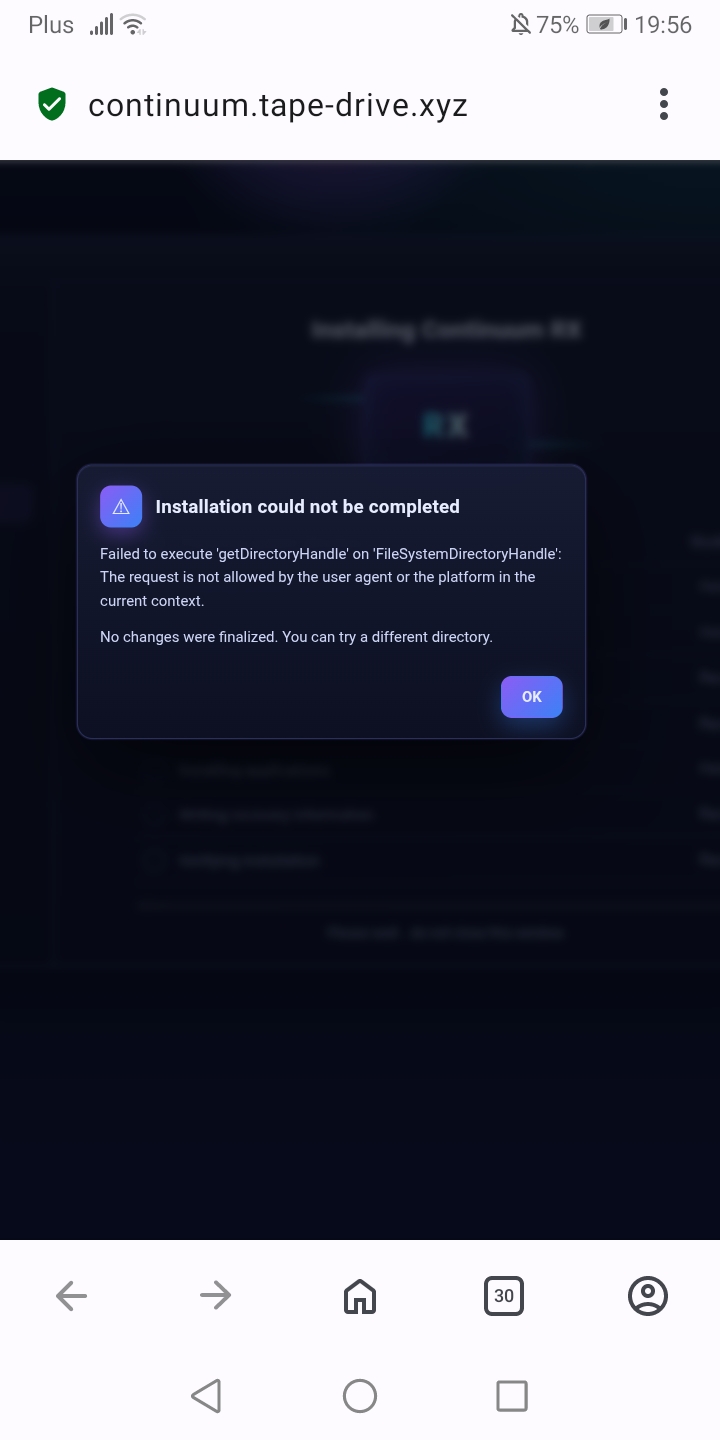
I cannot start an installation, though. Im getting an error. 

Im on Android, using latest mobile Opera browser. 

I tried different directories for the installation but none works. 

It says the request is not allowed by user but when selecting a directory, android asks for permision, which i do grant. 

Screenshot_20260719_195604_comopera_browser.jpgScreenshot_20260719_195604_comopera_browser.jpg
👍 0
#94430
[quote data-userid="178" data-postid="94425"]

This looks much better than i expected!

...

I cannot start an installation, though. Im getting an error. 

...

[/quote]

Hey, thanks!! :D

My bad, I forgot to mention, Continuum RX is absolutely not meant for mobile. It's a desktop/console-only experience.

If you'll try it on a PC you'll immediately understand why. :P

Installation is no big deal, you basically create a folder somewhere on a drive then point to it so it can take ownership of it. Outside of it it doesn't do anything.

Oh, and saves some session info in the browser's local data.

But you can click Start RX and on the next view just click the start temporary session to immediately see it in action.

I recommend using Chrome if you want the local AI features. Chrome will download a nano AI model that Continuum uses for various things, including a nice project called "A vs I" which you will find in the system tab on desktop.

With it you can set up a chat with several AI models, give them a topic to discuss and see how they dialogue about it. :)


I should really make a video...


👍 0